class: center, middle # Python for GIS and Geoscience Doctoral schools of Ghent University<br> November 23, 30 and December 7, 2026 Joris Van den Bossche, Stijn Van Hoey https://github.com/plovercode/DS-python-geospatial --- class: center, middle # Who are you? Go to https://hackmd.io/qww_pauJQgevaY5V8LdMUQ?both <iframe src="https://hackmd.io/qww_pauJQgevaY5V8LdMUQ?both" height="400px" width="800px"></iframe> --- ### Joris Van den Bossche <a href="https://github.com/jorisvandenbossche"><img src="./static/img/icon_github.svg" alt="Github logo" class="icon"> jorisvandenbossche</a> <a href="https://fosstodon.org/@jorisvandenbossche"><img src="./static/img/mastodon-svgrepo-com.svg" alt="Twitter logo" class="icon"> fosstodon.org/@jorisvandenbossche</a> * Open source software developer and teacher, part-time supported by a Sovereign Tech Fellowship * Pandas, GeoPandas, scikit-learn, Apache Arrow <div style="margin-bottom:50px"></div> .center[ .affiliations[   <img src="./static/img/sovereign-tech-agency.png" style="vertical-align: baseline; width: 15%;" /> ] ] --- ### Stijn Van Hoey <a href="https://github.com/stijnvanhoey"><img src="./static/img/icon_github.svg" alt="Github logo"> stijnvanhoey</a> * Freelance developer and teacher * Head of Product Development at [Fluves](https://www.fluves.com/) .center[ ] --- class: middle, section_background # Setting up a working environment --- ## Setting up a working environment For the setup instructions, see the [setup page](https://plovercode.github.io/DS-python-geospatial/setup.html). --- class: left, middle 1. Make sure to complete steps 1-5 of the [setup instructions](https://plovercode.github.io/DS-python-geospatial/setup.html) (install pixi, download course material, install and test the Python environment, start Jupyter Lab). 2. Note: make sure to (re)download ALL the course material, also if you already did this before. > If you succesfully done steps 1-4, put up your .green[`green sticky note`] on your laptop screen... Next: <ol start="3"> <li>Surf to and fill in <a href="https://hackmd.io/qww_pauJQgevaY5V8LdMUQ?both">the questionnaire</a></li> <li>In Jupyter Lab, start with the 'notebooks/00-jupyter_introduction.ipynb'.</li> </ol> > Installation or setup issues? Put up your .red[`red sticky note`] on your laptop screen. --- class: center, middle When you see something like this...  ...relax, you're ready to start! --- class: center, middle  --- class: middle, left ### Time is divided between - group sessions: we explain new concepts (aka 'theory') - practise sessions: you work on exercises or case studies In case of questions, remarks, suggestions, you can always interrupt us and just ask. During practise sessions, use the `red sticky note` on top of your laptop screen to let us know you have a question. ### Status check We will regularly ask for a check (ready with exercise, installation succesfull...). Use the `green sticky note` on top of your laptop screen to say 👍. ### Feel lost? Just ask either one of us, we are here to help you. --- class: middle, center  Report bugs, typo's, suggestions... as issues ([New issue](https://github.com/plovercode/course-python-geospatial/issues/new)) or see the [contributing guidelines](https://github.com/plovercode/course-python-geospatial/blob/main/CONTRIBUTING.md) --- class: middle, section_background # Working with Python --- # Dependency management ### Why using a package manager? - Consistent package manager across Windows, Mac and Linux - Many precompiled packages available -- ### Why different environments? - Manage the dependencies of a specific project/paper/group/... - You can install different version of Python and other packages alongside on your computer - Easily share environments with other -- ### Why conda packages? - Not limited to Python packages (PyPI), but for any language (e.g. GDAL, R, ...) --- ## Python package managers 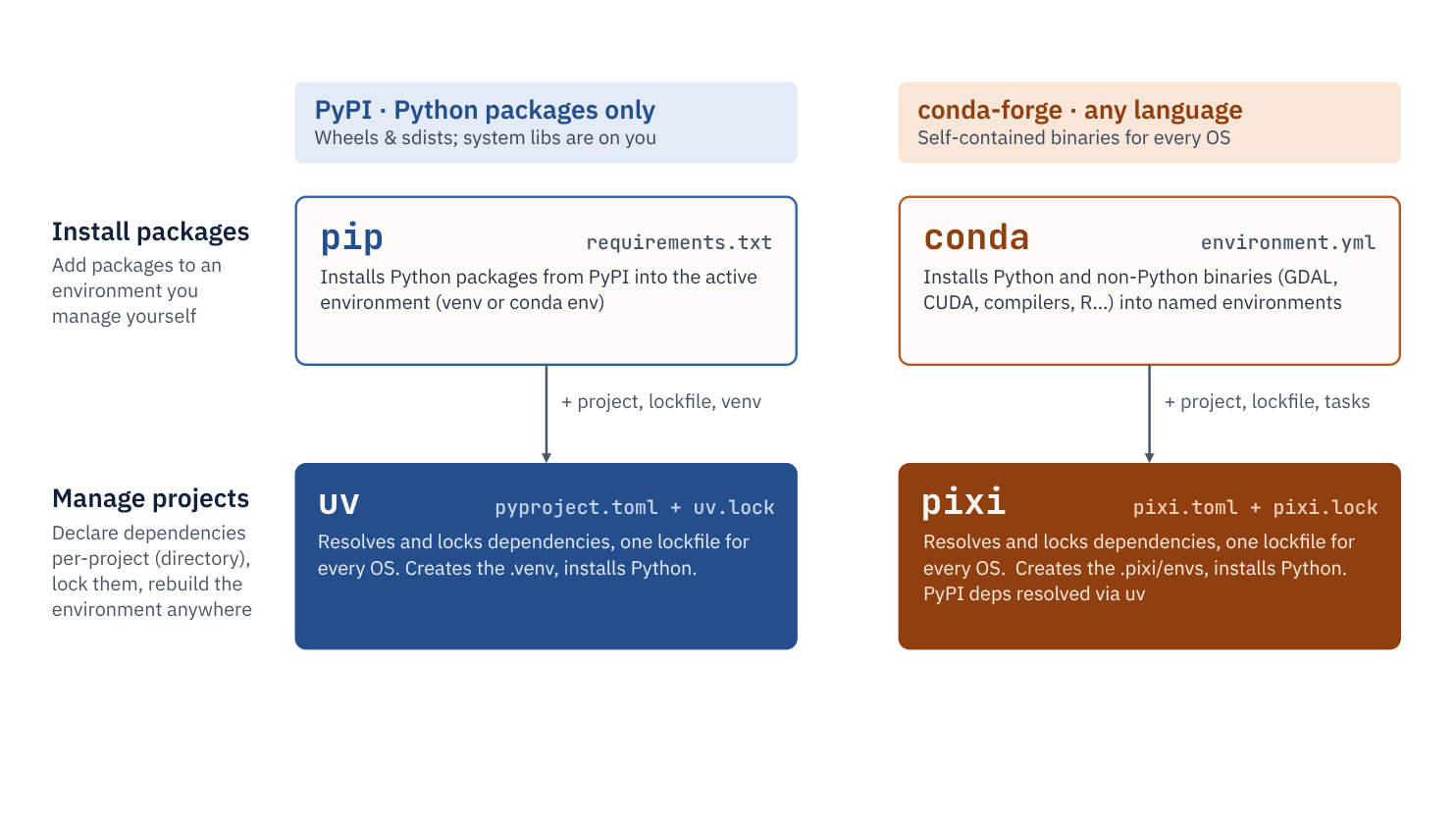 --- ## Small cheatsheet of Pixi commands Creating a new project (= folder with its own environment): ``` pixi init my_project cd my_project pixi add python=3.10 pandas ``` Using the environment (no activation needed): ``` pixi run jupyter lab # run a single command in the environment ``` Install a new package: ``` pixi add matplotlib # from conda-forge pixi add --pypi some-package # if only available on PyPI ``` Remove a package: `pixi remove matplotlib` List all installed packages: `pixi list` See the docs: https://pixi.prefix.dev --- ## Keep track of your python dependencies with `pixi.toml` and `pixi.lock` Pixi updates both files automatically on every `pixi add` / `pixi remove`. Share them (e.g. commit to git) and anyone gets the same environment with: ``` pixi install ``` <br><br><small> Need an `environment.yml` for conda users? ``` pixi workspace export conda-environment environment.yml ``` Need a terminal with an activated environment? ``` pixi shell ``` </small> --- # Writing Python code ## IPython console <br> .center[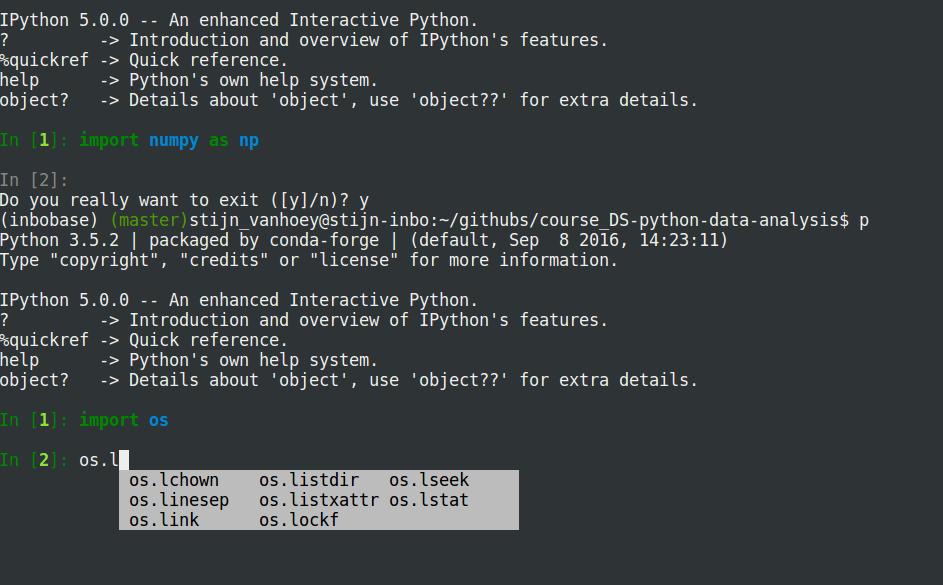] --- ## Interactive Development Environment (IDE) * [**VS Code**](https://code.visualstudio.com/): general purpose editor with powerful plugin ecosystem. * [**Spyder**](https://pythonhosted.org/spyder/): the familiar environment for Matlab/Rstudio-users. * [**PyCharm**](https://www.jetbrains.com/pycharm/): Popular for web-development and Django applications, powerful when doing 'real' development (packages, libraries, software) * [Eclipse + **pyDev plugin**](http://www.pydev.org/): If you already work in Eclipse, add the python environment * ... --- ## Jupyter Lab/Notebook <small>(*previously called IPython notebook*)</small> **Jupyter notebook** provides an **interactive** scripting environment,<br> ideal for exploration, prototyping,... .center[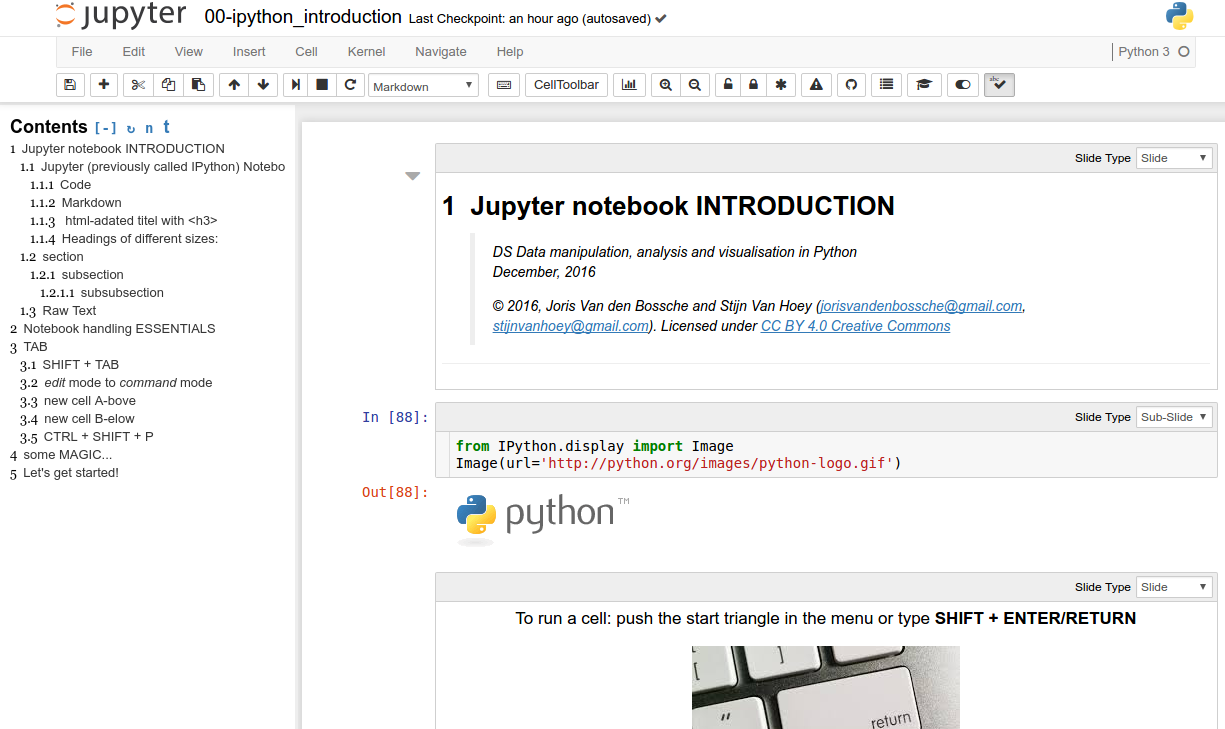] -- ...the stuff we're dealing with in this course! --- class: center, middle # How are you feeling?  ### [Feedback form](https://forms.gle/mzbvuHnCQH5Cp6J86) Please fill in the questionnaire. --- class: center, middle # Closing notes --- class: center, middle # Python's scientific/GIS ecosystem #### ## Inspired by figure by Jake VanderPlas --- class: center, middle, bgheader background-image: url(./static/img/ecosystem-gis-overview_6.svg) background-size: cover --- class: center, middle, bgheader background-image: url(./static/img/ecosystem-gis-overview_5.svg) background-size: cover --- class: center, middle, bgheader background-image: url(./static/img/ecosystem-gis-overview_3.svg) background-size: cover --- class: center, middle, bgheader background-image: url(./static/img/ecosystem-gis-overview_2.svg) background-size: cover --- class: center, middle, bgheader background-image: url(./static/img/ecosystem-gis-overview_1.svg) background-size: cover --- class: center, middle, bgheader background-image: url(./static/img/ecosystem-gis-overview.svg) background-size: cover --- # A rich ecosystem of packages <br>  Python Spatial Analysis Library (https://pysal.org). Collection of packages for: * detection of spatial clusters, hot-spots, and outliers * construction of graphs from spatial data * spatial regression and statistical modeling on geographically embedded networks * spatial econometrics * exploratory spatio-temporal data analysis * ... --- # A rich ecosystem of packages <br> Building up on / integrating with GeoPandas: **MovingPandas** (https://movingpandas.org/): working with movement data **Momepy** (http://docs.momepy.org/en/latest/): quantitative analysis of urban morphology **...** Check out the [GeoPandas ecosystem](https://geopandas.org/en/stable/community/ecosystem.html#geopandas-ecosystem). --- # A rich ecosystem of packages <br> Building up on / integrating with xarray: **Satpy** (https://satpy.readthedocs.io/en/stable/): package for earth-observing satellite data processing **xesmf** (https://xesmf.readthedocs.io/): Universal Regridder for Geospatial Data **verde** (https://www.fatiando.org/verde/): interpolating spatial data on regular grids **...** Check out the [Xarray ecosystem](https://docs.xarray.dev/en/stable/user-guide/ecosystem.html). --- # A rich ecosystem of packages <br> Several more domain/application specific packages: **MetPy** (https://unidata.github.io/MetPy): working with weather data **xgcm** (https://xgcm.readthedocs.io/en/latest/index.html): working with output from General Circulation Models **osmnx** (https://github.com/gboeing/osmnx): street networks **...** --- class: center, middle ### Reading advice [Good Enough Practices in Scientific Computing](https://arxiv.org/pdf/1609.00037v1.pdf) > "*However, while most scientists are careful to validate their laboratory and field equipment, most do not know how reliable their software is*" --- class: center, middle # Thanks ### Joris Van den Bossche <a href="https://github.com/jorisvandenbossche"><img src="./static/img/icon_github.svg" alt="Github logo"> jorisvandenbossche</a> ### Stijn Van Hoey <a href="https://github.com/stijnvanhoey"><img src="./static/img/icon_github.svg" alt="Github logo"> stijnvanhoey</a>